

3V0-13.26 Practice Tests: What Can They Help You Review?
DumpsBase 3V0-13.26 practice tests, including 115 exam questions and answers, can give you a structured way to prepare for your VMware Certified Advanced Professional – VMware Cloud Foundation Support exam. Those practice questions will help you review the VCAP-VCF Support exam objectives, work through expert-verified exam questions, and boost confidence before exam day.
What the 3V0-13.26 Practice Tests Can Help You Review
The 3V0-13.26 practice tests can help you review the exam objectives:
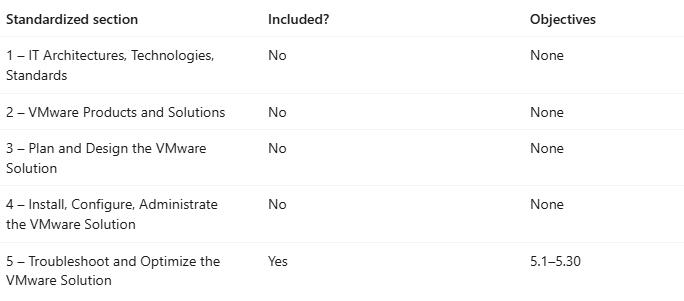
The current exam guide lists one section with testable objectives:
- Section 5: Troubleshoot and Optimize the VMware Solution
The official objectives cover areas such as:
- VMware vSAN and supported non-vSAN storage monitoring and troubleshooting
- VCF Workload Domain, ESX host, vCenter, cluster, and virtual machine issues
- Workload Domain performance and virtual machine optimization
- VCF Automation monitoring, Provider Management, and All Apps Organizations
- Supervisor and vSphere Kubernetes Service cluster provisioning, connectivity, namespace, and IP errors
- Container deployment, registry, trusted CA, and failed VKS upgrade issues
- Cluster monitoring, scaling, and performance optimization
- VCF Operations infrastructure configuration, alerts, workloads, and configuration problems
- VCF Operations for Networks and VCF Operations for Logs
- NSX troubleshooting, connectivity, routing, ECMP, high availability, and logical routing packet walks
By the way, Sections 1 through 4 are marked as having no testable objectives. Their underlying concepts can still support questions in Section 5, so candidates should not ignore VCF architecture, products, configuration, or administration basics.
You can use the 3V0-13.26 practice tests to organize questions by subject, keep notes beside uncertain answers, and create a revision list for storage, networking, automation, operations, or VKS topics. With the most current questions and answers, you can understand the exam objectives and prepare for your VMware Certified Advanced Professional – VMware Cloud Foundation Support exam well.
Free 3V0-13.26 Practice Demo Questions
Below are 5 free demo questions to help you preview the practice tests:
Question 1:
You have a 3-node vSAN cluster in a VCF Workload Domain. The default storage policy is set to RAID-1 (Mirroring) with FTT=1. To perform firmware upgrades, you place Host-03 into Maintenance Mode using the “Ensure accessibility” data migration option. While Host-03 is in maintenance mode, vRealize Automation attempts to deploy a new virtual machine to this cluster, but the deployment fails with a “Failed to create object” storage error.
What is the root cause of this failure?
A. The vSAN capacity tier on the remaining two hosts has exceeded the 80% threshold, blocking new deployments.
B. A 3-node cluster with one host in maintenance mode only has 2 active fault domains. An FTT=1 policy requires at least 3 fault domains (2 for data components, 1 for witness) to provision a new object.
C. The APD (All Paths Down) timer for the objects residing on Host-03 has expired.
D. The CMMDS master role was held by Host-03, and the election process for a new master has timed out.
Answer: B
Explanation:
vSAN requires a minimum number of fault domains (hosts) to provision a new object based on the storage policy. For FTT=1 (RAID-1), vSAN must write two data replicas and one witness, requiring 3 distinct hosts. If one host in a 3-node cluster is in maintenance mode, only 2 hosts are available. While existing VMs remain accessible (thanks to the “Ensure accessibility” option), vSAN physically cannot place the 3 required components for a new VM, causing the provisioning to fail.
Question 2:
An ESXi host in a Workload Domain suddenly crashes and displays a Purple Screen of Death (PSOD). The error message on the screen prominently displays “LINT1/NMI (motherboard nonmaskable interrupt)” and mentions a hardware Machine Check Exception (MCE).
As a support engineer, what is the primary cause of an NMI PSOD, and what is your immediate next step for root cause analysis?
A. The PSOD is caused by a software bug in the hostd agent; you should extract the vmkernel-zdump and open a case with VMware support to request a patch.
B. The PSOD is caused by a severe hardware failure (such as faulty RAM or a failing PCIe card); you should log into the physical server’s out-of-band management interface (e.g., iLO, iDRAC) to inspect the hardware event logs.
C. The PSOD is caused by an APD (All Paths Down) storage timeout; you should check the Fibre Channel switch zoning configurations.
D. The PSOD is caused by a vSphere HA isolation response; you should check the physical top-of-rack switch for dropped network uplinks.
Answer: B
Explanation:
An NMI (Non-Maskable Interrupt) or MCE (Machine Check Exception) PSOD is directly triggered by the physical server’s hardware, not by a bug in the ESXi hypervisor software. The hardware asserts an interrupt to halt the system to prevent data corruption when a critical component fails (most commonly faulty DIMMs, CPU caches, or PCIe bus errors). The ESXi host merely reports the hardware’s distress signal. The correct troubleshooting path is to consult the hardware vendor’s management logs (IML, SEL) to identify the failing physical component.
Question 3:
The vCenter Server Appliance (vCSA) becomes unresponsive, and users receive a “503 Service Unavailable” error when accessing the vSphere Client. You SSH into the vCSA, authenticate as root, and execute the df -h command. You observe that the /storage/seat partition is at 100% utilization.
What specific data is exhausting this partition, and what is the standard administrative action to mitigate this issue?
A. The partition is filled with ESXi host update payloads (ISO files). You must delete old images from the Lifecycle Manager repository.
B. The partition is filled with Stats, Events, Alarms, and Tasks (SEAT) data from the Postgres database. You should reduce the database retention policy and run the provided Python script or vpxd command to truncate the oversized tables.
C. The partition is filled with vCenter core dumps. You should use the rm command to delete .tgz crash files from the directory.
D. The partition is filled with SSO authentication logs. You should rotate the logs using the journalctl utility.
Answer: B
Explanation:
In the vCSA architecture, the /storage/seat partition specifically houses the Postgres database tables responsible for storing performance statistics, vCenter events, alarms, and task history. When a vCenter environment generates excessive events (e.g., an aggressive backup script or a flapping network adapter), this partition fills up, causing the Postgres database to halt, which crashes vCenter services. The fix involves freeing space by truncating these SEAT tables and adjusting the data retention settings in the vSphere Client once it is brought back online.
Question 4:
A high-throughput network appliance VM (such as a load balancer or firewall) is experiencing high application latency. By analyzing the guest OS network statistics, you discover a high number of dropped packets on the receive side (Rx drops). However, the physical ESXi host uplinks (vmnic) show zero dropped packets in esxtop. You conclude the VM’s virtual network adapter is being overwhelmed.
Which TWO actions can help mitigate Rx packet drops directly at the VM level?
A. Change the virtual network adapter type from E1000e to VMXNET3.
B. Increase the physical switch port MTU to 9000 (Jumbo Frames).
C. Increase the Rx Ring Buffer sizes (e.g., Rx Ring #1 and Rx Ring #2) within the guest OS driver settings for the virtual adapter.
D. Enable Network I/O Control (NIOC) on the Distributed Virtual Switch and set the VM’s share value to “High”.
E. Configure a traffic shaping policy on the port group to limit the VM’s egress bandwidth.
Answer: A, C
Explanation:
If the physical host is not dropping packets, but the guest OS is, the bottleneck is inside the VM’s virtual adapter queue.
● Option A is correct: VMXNET3 is highly optimized for performance and has significantly larger default buffer capabilities compared to the emulated E1000/E1000e adapters.
● Option C is correct: Even with VMXNET3, sudden micro-bursts of traffic can overwhelm the default receive buffer (Rx Ring) before the guest OS CPU can process the packets. Increasing the Rx Ring buffer size (via Windows Device Manager or Linux ethtool) gives the VM more memory to queue incoming packets, preventing drops.
Options B, D, and E address physical infrastructure or outbound traffic, which does not solve an internal VM Rx buffer overflow.
Question 5:
Following an unexpected storage array outage and subsequent recovery, a virtual machine in the vCenter inventory is greyed out and displayed with the status “(orphaned)”. The underlying VMFS datastore has been verified as fully mounted and accessible. Arrange the following steps in the correct order to recover the orphaned VM and bring it back to a manageable state in the vCenter inventory.
- Right-click the orphaned VM in the vCenter inventory and select “Remove from Inventory”.
- Navigate to the Datastore Browser, locate the VM’s directory, and find the .vmx (configuration) file.
- Right-click the .vmx file and select “Register VM”.
- Follow the registration wizard to select the correct cluster, host, and VM folder.
A. 1 -> 2 -> 3 -> 4
B. 2 -> 3 -> 1 -> 4
C. 1 -> 3 -> 2 -> 4
D. 3 -> 1 -> 4 -> 2
Answer: A
Explanation:
An “orphaned” status means vCenter has the VM registered in its database, but it cannot locate the VM’s files on the expected datastore (often due to UUID changes or transient storage disconnects).
(Step 1) You must first tell vCenter to forget the stale database entry by removing the orphaned object from the inventory (this does not delete files).
(Step 2) You then locate the actual files on the restored datastore.
(Step 3) You initiate the registration process using the .vmx file.
(Step 4) Finally, you map the VM back to the desired compute resource and inventory folder.
DumpsBase 3V0-13.26 practice tests can support that routine by giving you a convenient way to review scenario-based questions and track areas that need further study. Using them alongside undestanding the exam objectives gives you a clearer basis for deciding when you are ready to schedule the VMware Certified Advanced Professional – VMware Cloud Foundation Support (VCAP-VCF Support) certification exam.
About The Author

DumpsBase
DumpsBase provides practice tests and exam preparation resources for IT certifications. Review key topics, practice scenario-based questions, and learn from detailed answer explanations.